
Research Gates
Tweaking a strategy until its backtest looks good compounds luck. The Research Gates check a strategy the way it was actually found, so you can tell a real edge from a lucky one before you trade it. They work the same for a strategy you wrote, one the copilot or your own AI agent built, or one found by Edge Miner or ML Discovery.
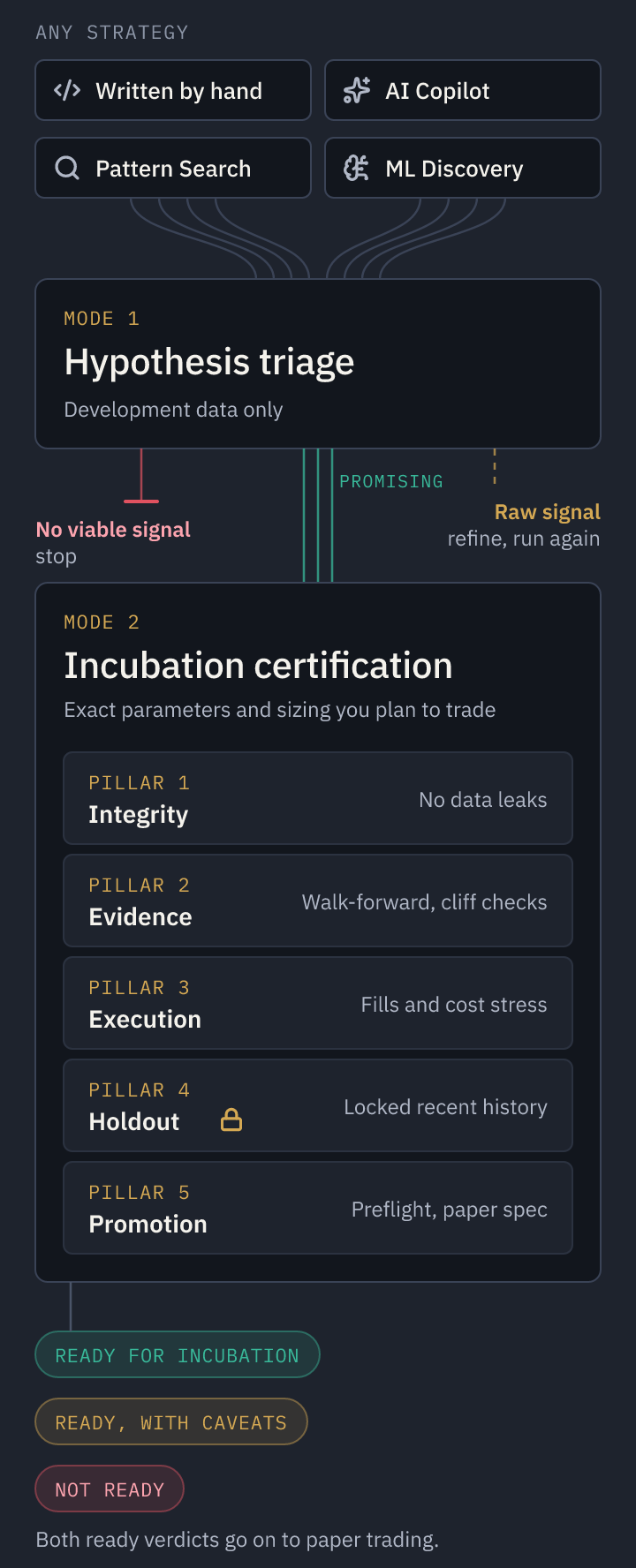
The gates run in two modes:
- Mode 1, Hypothesis Triage: Worth developing? A quick check on development data only.
- Mode 2, Incubation Certification: Ready for incubation? A full check across five pillars, including one look at data the strategy has never seen.
The holdout
Section titled “The holdout”Every market keeps its most recent stretch of history locked away as a holdout. How long it is depends on the bar size:
| Bars | Holdout (up to) |
|---|---|
| 15 minutes or shorter | 6 months |
| Up to 4 hours | 12 months |
| Daily | 24 months |
A shorter history gets a shorter holdout, never more than about a fifth to a quarter of the data.
By default, Backtest, Optimizer, Market Scan, Walk Forward and the other tabs stop at the start of the holdout, which is why their end dates can be clamped. Settings › Data policy can change this for your own tabs, and the gates keep the holdout either way. Only Mode 2 reads the holdout.
Each Mode 2 run spends one look at the holdout, and every look is counted against the strategy’s family (its versions over time). Repeats are allowed and counted, never refused, so the certificate can show how often the holdout was used. You can see the holdout dates and look counts in Gates › Holdout Vault.
Run an evaluation
Section titled “Run an evaluation”- Open Strategy Suite › Gates.
- Choose Mode 1 · Hypothesis Triage or Mode 2 · Incubation Certification.
- Pick the Strategy, the Instrument & Asset Class and the Bar Type.
- Choose a strictness: Conservative, Standard or Lenient. Standard is the usual choice.
- Check the preview line. It shows the development and holdout dates and how many looks this family has spent.
- Click Run Triage or Run Certification.
The example strategies that come with the app stay in a family of their own, so trying them never counts against your own strategies.
Mode 1: Hypothesis Triage
Section titled “Mode 1: Hypothesis Triage”Mode 1 takes about 1 to 15 minutes and never touches the holdout. It checks whether the idea has a signal worth working on: does it survive realistic costs, does it hold up when its parameters move a little, does it work on neighbouring timeframes, and does it beat simply holding the market.
It ends in one of three outcomes:
- Promising — Worth Developing: the signal survives realistic costs and beats passive exposure. Refine it and send it to Mode 2 with Promote to Mode 2 Certification.
- Raw Signal — Needs Engineering: there’s structure there, but something holds it back. The result names what, for example:
- Cost Wall: costs eat the edge.
- Exit Leakage: exits give back what entries find.
- Long Side Drag or Short Side Drag: one side loses.
- Parameter Spike: it only works at one exact setting.
- Regime Decay: it worked once and is fading.
- Passive Exposure: it doesn’t beat simply holding the market.
- No Viable Signal: no signal worth developing.
Mode 2: Incubation Certification
Section titled “Mode 2: Incubation Certification”Mode 2 certifies the exact parameters and position sizing you plan to trade. It runs five pillars:
- Contract, Provenance & Anti-Leakage: the strategy follows the rules, its data is sound and long enough, and no model or parameter was trained on the data used to score it.
- Development Evidence, WFO & 1D Cliff: a rolling walk-forward test, a check that results don’t fall off a cliff when each parameter moves ±10% or ±20%, and whether it beats buy-and-hold once the search that found it is priced in.
- Execution Truth, Friction & Latency Stress: part of the history is re-run on the finest fills your data allows (order book, trade ticks or 1-second bars), the measured difference is charged across the whole run, costs are stress-tested at 1.5× and 2×, and latency at two higher delays set by your latency profile (colocated, retail or slow).
- Unseen Holdout: one sealed run on the holdout to see whether the edge persisted.
- Pack Integrity & Live Preflight: checks that code, data and costs are consistent, then writes a Promotion Pack with a forward-test (paper trading) plan.
If the development results already look too much like luck, the evaluation stops as Paused Before Holdout with no look spent. You decide whether to continue with Continue to the holdout, which spends one look.
The verdicts
Section titled “The verdicts”Mode 2 ends in one of three verdicts, and always says what would change it:
| Verdict | What it means at Standard strictness |
|---|---|
| Ready for Incubation | No more than a 10% look-alike rate, beats buy-and-hold on a risk-adjusted basis, and no caveats |
| Ready, with Caveats | A 10% to 25% look-alike rate, or a named weakness such as coarse bar fills, a thin cost margin or a negative holdout |
| Not Ready | Above a 25% look-alike rate, or a data leak, a parameter cliff or a losing strategy |
The look-alike rate is how often strategies with no real edge, searched and refined the same way yours was, would score as well. A lower rate means a result is less likely to be luck. Conservative strictness tightens the bands to 5% and 15%; Lenient loosens them to 15% and 30%.
A ready verdict means ready for incubation: paper trading the exact plan to see whether it holds up live. It’s evidence, not a promise of future results.